On a laptop? Scan to install.Point your phone camera here. It opens the App Store or Google Play.
No account
Works offline
Links never open on their own
PNG, SVG, PDF
Scans well
Wi-Fi joined
Look-alike link caught
App tour
Walk through QR Office
Scroll to move through the app, from Home to your first code, a scan and beyond.Swipe the phone to move through the app, from Home to your first code, a scan and beyond.
01 / 07 · Home
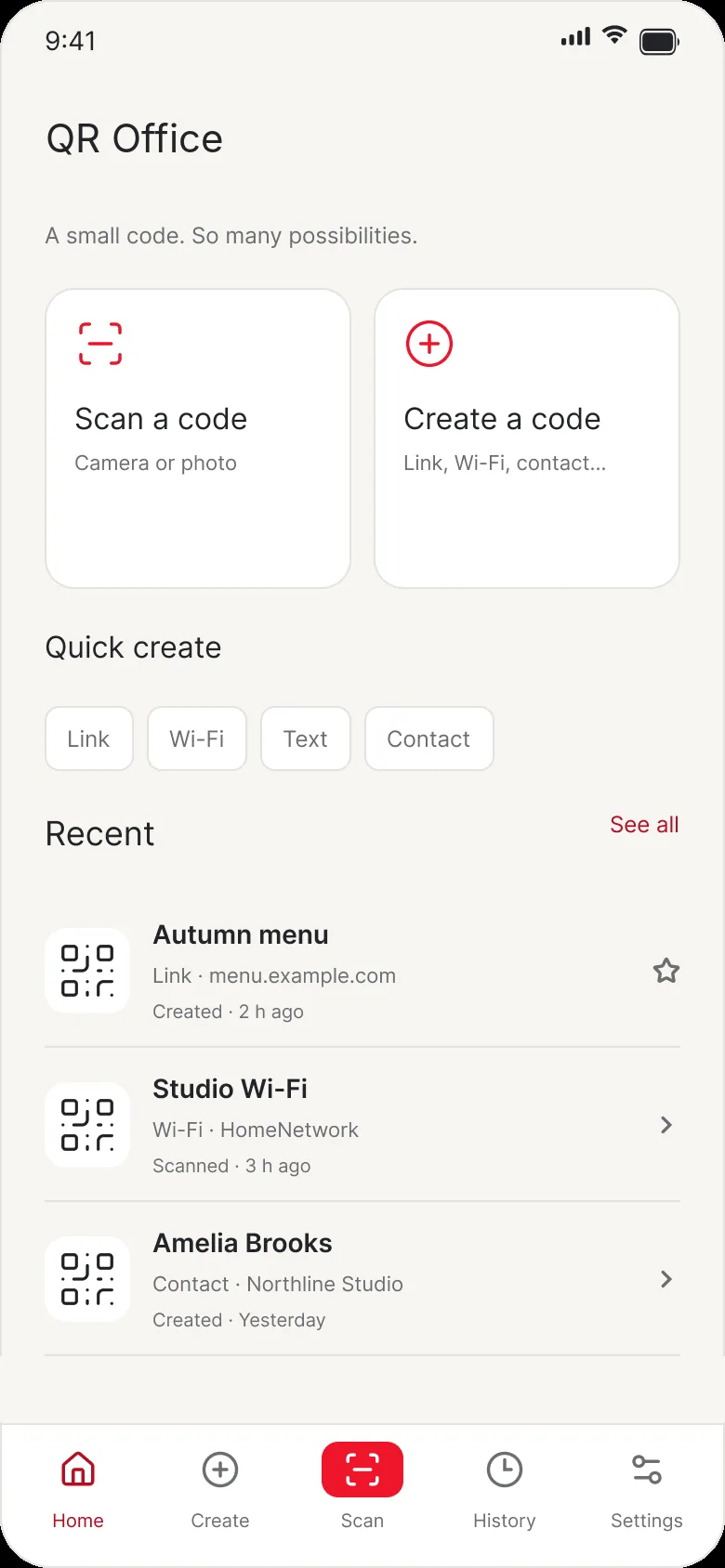
Start from Home
Everything begins with two big buttons, so the two things people come for are one tap away.
Scan a code with the camera or from a photo
Create a code for a link, Wi-Fi, contact and more
Quick create chips for the four most used types
Recent shows your latest five codes, with See all
02 / 07 · Create
Pick what to share
Choose one of seven types. Each opens a short form with the right keyboard and checks your input before making the code.
Link, Text, Wi-Fi, Contact, Phone, Email and SMS
Pick a contact straight from your phone
Nothing to sign up for, and it works offline
03 / 07 · Design
Style it, then check it
The code updates live as you change colours or try a preset. A readability check tells you if it will still scan.
Foreground and background colours, swap or reset in a tap
Scans well check for contrast and quiet zone
Dot and corner styles and your logoPREMIUM
Export PNG, SVG or a print-ready PDF, share, or save to Photos
04 / 07 · Scan
Scan and act in one tap
Point the camera or pick a photo. QR Office reads the code and offers the action that fits what's inside.
Join a Wi-Fi network without typing the password
Save a contact, add an event, call, email or open a map
Copy or share the content
Every scan is saved to History automatically, and you can turn that off
05 / 07 · Safety
Links never open on their own
You always see the full address first. Risky links get a warning, and dangerous link types are blocked outright.
Look-alike addresses, shortened links and raw IP addresses are flagged
Unencrypted http links are called out
Schemes that can run code, like javascript:, never open
06 / 07 · History
Find any code again
Every code you create or scan lives on your phone, grouped by day.
Search by name or content, filter by type or by created and scanned
Mark favourites, swipe to delete with Undo
Organise with foldersPREMIUM
Wi-Fi passwords and 2FA secrets stay encrypted until you unlock
07 / 07 · Premium
Go Premium if you like
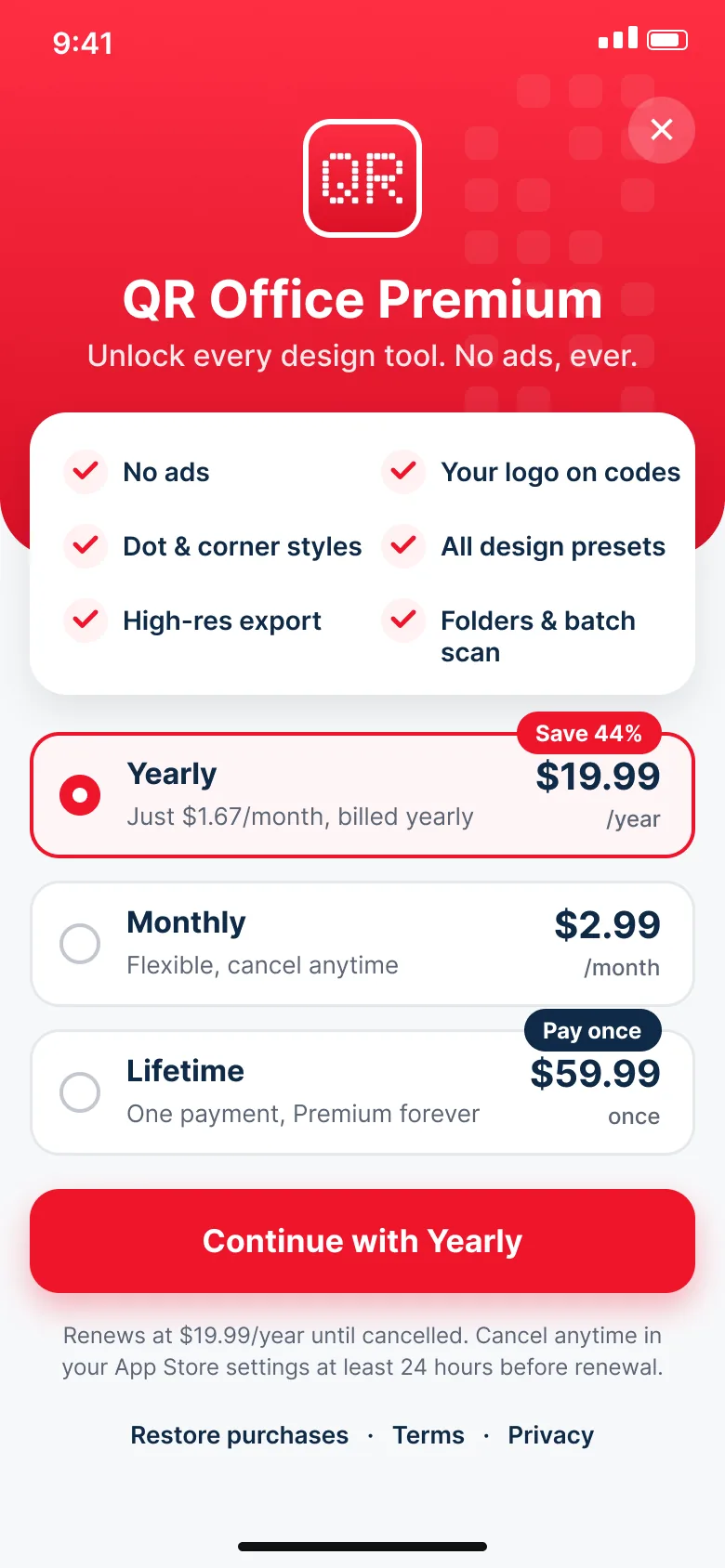
The free app is complete for everyday use. Premium removes every ad and adds the design tools.
No ads, your logo on codes, dot and corner styles
All design presets, high-resolution export, folders and batch scan
$2.99 a month, $19.99 a year, or $59.99 once
Restore purchases on a new phone
Home
01 / 07 · Home
Start from Home
Everything begins with two big buttons, so the two things people come for are one tap away.
Scan a code with the camera or from a photo
Create a code for a link, Wi-Fi, contact and more
Quick create chips for the four most used types
Recent shows your latest five codes, with See all
Create
Seven kinds of code, styled your way
Pick a type, fill in a short form, and watch the code update as you go.
LinkA web address
TextAny text
Wi-FiName, password, security
ContactTyped in or picked from contacts
PhoneA phone number
EmailAddress, subject, message
SMSNumber and message
Design it
Pick your own colours or start from a preset. Premium adds every preset, dot and corner styles, and your logo in the middle.
Classic
Crimson
Porcelain
Readability check
Low contrast or a busy design can make a code hard to scan. QR Office warns you before you print.
Export anywhere
Save to Photos or Files, or share with any app. Every code also lands in History. Premium adds high-resolution export.
PNGSVGPDF for print
Scan
Point, scan, and act in one tap
Use the camera, with a torch for dark corners, or scan a code from a photo or image file. The camera only turns on while you scan, and the app asks for it only then.
What it reads
Links
Text
Wi-Fi
Contacts
Phone numbers
Emails
SMS
Locations
Calendar events
2FA setup codes
Passkey sign-in
Sound and vibration confirm each scan. Turn either off in Settings.
What one tap does
Wi-FiJoin the network
ContactSave to your contacts
EventAdd to your calendar
PhoneCall the number
Email, SMSOpen a ready-to-send message
LocationOpen it in your map app
PasskeyHand it to your phone's own sign-in
Check this link first
https://rnybank.com/verify-account
This address looks like mybank.com but it is a different site. The letters "r" and "n" stand in for "m".
Copy linkOpen anyway
Link safety
Links never open on their own
A code can hide any address. QR Office always shows you the full link and waits for your tap, and it flags the tricks scammers use most.
Look-alike addressesLetters swapped to copy a real site, like rnybank.com for mybank.com
Shortened linksServices that hide where a link really goes
Raw IP addressesNumbers in place of a name, like http://45.12.8.3/login
Unencrypted linksPlain http, where anyone on the network can read what you send
Blocked link typesSchemes that can run code or open files, which never open from a scan
Private by design
Your codes stay on your phone
No account, no sign-in, no name. We never see the codes you create or scan.
No account
Open the app and start. Nothing to sign up for.
Works offline
Creating and scanning need no internet at all.
Stored on the phone
History lives on your device. Android backups of the app's data are turned off.
Secrets encrypted
Wi-Fi passwords and 2FA secrets are encrypted and shown only after Face ID, fingerprint or passcode.
No tracking on iOS
The app does not track you and asks only for non-personalised ads.
Ad consent first
In the EEA, UK and Switzerland, Google's consent form appears before any ad loads.
A device record: model, system and app version, region, language
Support and feedback messages you send
Usage counts, never the content of codes
Crash reports
Ad data collected by Google AdMob
Purchase status through RevenueCat, if you buy Premium
History
Every code, easy to find again
Search and filter
Find a code by name or content, or filter by type.
Favourites
Pin the codes you use most. Premium adds folders.
Swipe with Undo
Delete with a swipe, take it back with Undo. Select several to share or delete at once.
Unlock to reveal
Saved secrets show for 30 seconds after you unlock. Scan history can be turned off or cleared by time range.
Free and Premium
Free to use. Premium for more.
Creating, scanning, link safety and History are free, with ads. Premium removes every ad and adds the design tools.
Premium includes
No ads, anywhere in the app
Your logo on codes
Dot and corner styles
All design presets
High-resolution export
Folders and batch scan
Save 44%
Yearly
$19.99/ year
Works out to $1.67 a month. Renews every year.
Monthly
$2.99/ month
Renews every month. Cancel any time.
Lifetime
$59.99once
Pay once, never renews. About three years of Yearly.
Where ads appear in the free app
Ads never interrupt a scan, and none appear while you have Premium.
One small banner under the tab bar
A native ad styled like a code row in Recent and History
An optional short video offered when you save a code
Prices in USD. Local prices and taxes are set by Apple and Google. Subscriptions renew automatically unless cancelled at least 24 hours before the period ends. See the terms of use.
Coming next
Where QR Office is heading
These features are planned and not in the app yet. Everything above this section is in version 1.0.
Planned
Accounts and sync
Optional sign-in to keep your codes on more than one phone. The app will keep working without an account.
Planned
Dynamic codes
Change where a printed code points, any time, without reprinting it.
Planned
Scan statistics
See how often your dynamic codes are scanned, by day, device and country.
Planned
Business dashboard on the web
Manage codes, campaigns and app deep links from your browser.
Planned
iPad and tablets
Layouts made for bigger screens.
Planned
Bulk creation
Make hundreds of codes at once from a spreadsheet.
Planned
More languages
QR Office in the 20 most used languages, after English.
Planned
Link pages
One small page with all your links, behind a single code.
FAQ
Questions people ask
Is QR Office free?
Yes. Creating, scanning, link safety and History are free, with ads. Premium removes ads and adds design tools.
What do I get with Premium?
No ads, your logo on codes, dot and corner styles, all design presets, high-resolution export, folders and batch scan. Prices are $2.99 a month, $19.99 a year or $59.99 once.
Do I need an account?
No. There is no sign-in and we never ask for your name.
Does it work offline?
Yes. Creating and scanning work without internet. Internet is only used for ads, support messages, and crash and usage statistics.
Can you see my codes?
No. The codes you create and scan stay on your phone. We never receive them.
Is it safe to scan unknown codes?
Links never open on their own. You see the full address first, and the app warns you about risky links. Warnings help, but no tool can catch every bad link, so open only what you trust.
Which formats can I export?
PNG, SVG and a print-ready PDF. Save to Photos, save to Files, or share with any app. Premium adds high-resolution export.
What happens if I change phones?
History is stored on the phone. On iOS it can come back with an iCloud or computer backup of the phone. On Android it does not transfer. Premium comes back with Restore purchases.
How do I cancel Premium?
In your App Store or Google Play subscriptions, or from Settings in the app. Premium stays on until the end of the period you paid for.
When do the planned features arrive?
They are on our roadmap and not in the app yet. We will announce each one on this page and in the app's What's new when it ships.
Support
Ask us anything
Send a message and we reply by email, usually within two working days. In the app, use Settings, then Help, then Contact support.